
Foreword
In this guide, I would like to show you how to operate a Tor exit node.
The Tor network needs more and more help. Privacy is becoming increasingly important, as there are more and more laws that restrict the privacy of all people. I won’t explain exactly what Tor is here. If you want to install a Tor exit node, you should hopefully already know what it is.
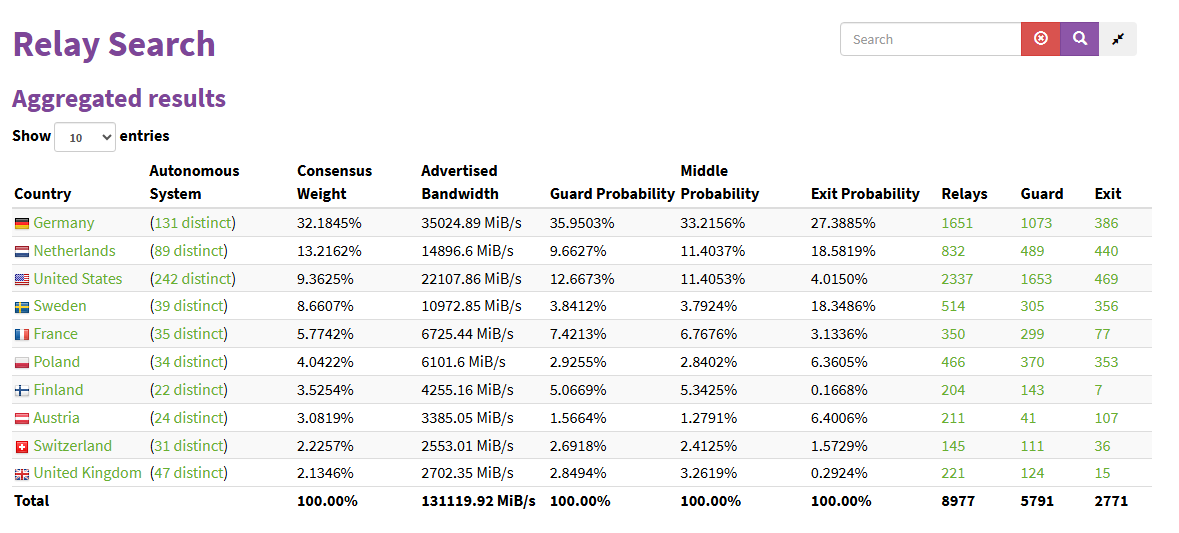
One major problem with Tor is the very low level of decentralization of the network. Most nodes are located in Germany, the Netherlands, and the US. Of course, it’s not a bad thing to host a node there, but Tor specifically recommends that, if possible, you host your node in a country where there are still very few or even no nodes at all. Tor also advises against hosting with well-known, large providers such as Hetzner, as there are already so many nodes there. This should definitely be taken into account when choosing a provider.
There is a general shortage of exit nodes. This is because most people understandably do not want to deal with the legal issues involved. Depending on the country, the legal consequences can be very severe. To prevent this problem, I recommend simply renting a completely anonymous VPS server.
Please do not host a Tor exit node at home under any circumstances. Many hosts/websites will block access from your IP address, as a large number of hosts/websites block all Tor IP addresses by default. This simply leads to many problems.
The distribution of countries is clearly visible in the image.
Payment
Under all circumstances, always pay for everything only with Monero or with prepaid credit cards purchased with Monero. Nothing else - ever!
It doesn’t really matter where you buy Monero. KYC is irrelevant with Monero, as the blockchain offers complete privacy. It is not traceable like Bitcoin, for example.
So you can simply buy Monero via Coinbase, Bitpanda, etc. and then send the coins to your Monero wallet. For the ultra-paranoid: You can also buy Monero with cash, then there is no KYC.
This is possible, for example, at https://openmonero.com. There you need to check whether there are trustworthy dealers in your country. Be sure to look at the dealers’ ratings. You can then send cash to the dealers, who will then send Monero to your wallet.
For security reasons, you should download the Monero wallet and select “local full node” during setup. This downloads the entire blockchain and you are your own node and do not use an “unknown remote node.” https://www.getmonero.org/downloads/#gui
Monero also recommends this for advanced protection. But even if you don’t do it, the risk is manageable: the remote node can only see your IP address. So you can theoretically get around it with a VPN, or just ignore it.
VPS Management
Once you have found a provider that accepts Monero as payment and purchased your VPS, only manage it via a VPN so that nothing can ever be traced back to you. I recommend Mullvad as a VPN because they definitely do not collect any logs and also accept payment with Monero.
Installation
Update Repositories
First, we update the repositories.
|
|
Update System
Then we update the system.
|
|
Install apt-transport-https
Then we install “apt-transport-https”.
|
|
Add Tor Repository
|
|
Add the following two lines:
|
|
Install GnuPG
Now we need to install “gnupg”. In Debian, it is usually already installed.
|
|
Add Tor GPG key
|
|
Update Repositories
|
|
Install Tor
|
|