Pretty much every AD security assessment, pentest report or architecture review ends up with the same line in it somewhere: switch from unencrypted LDAP to LDAPS. It’s been showing up in those reports for about fifteen years and it’s not going away.
I’ve lost count of how often I’ve been asked the follow-up question. Can we switch this on? Does that tool over there support it? When are we scheduling it?
The answer I keep giving is some version of: we’re not, and you don’t need to. I know how that sounds — like someone talking their way out of work. But in most environments LDAPS wouldn’t fix the thing the report is actually worried about, and it took me a while to work out how to explain that in less than a page. So, the page.
What’s actually wrong with LDAPS?
Nothing, as such. Getting it running is well documented and mostly straightforward: certificate with the right EKU onto your DCs, into the right store, check 636 answers. There are thousands of posts about this and plenty of them are good.
Two things they usually skip.
First, certificate selection on a DC is a black box. If there’s more than one candidate sitting in the store you don’t get to say which one gets used, and if it picks the wrong one, nothing tells you. Marc-André Moreau reverse-engineered the selection logic in ntdsai.dll and came out with roughly that conclusion: no way to choose, nothing to log, nothing to diagnose. The detail that catches people is the tie-breaker — among the certificates that validate, the DC simply takes the one whose expiry is furthest in the future. So the one-year machine certificate quietly beats the three-month Let’s Encrypt certificate you actually wanted, every renewal cycle. Moreau’s workaround is to put the intended certificate into the NTDS service’s own store, which is searched before the machine store and which neither certlm.msc nor the cert: drive will show you. Worth a read in full if you’re doing this anyway.
Second, and this is the one that matters — nobody tells you what to do with LDAPS once it’s on. And the honest answer is: not much, because your DCs keep serving plain LDAP on 389 and the GC on 3268 exactly like before. You can’t turn that off. Block it at the firewall and you’ll break your own domain members.
Let me say that more plainly, because it’s the whole argument:
A domain member uses 389 and 3268 for the LDAP and GC lookups it does simply by being a domain member. There is no GPO, no registry key, no DNS trick that moves that traffic to 636.
And there’s no standard way for the infrastructure to tell an application “use LDAPS instead” either, which is the other half of the problem.
Why the workarounds don’t work
DNS is the only service discovery LDAP has, so every attempt to force the issue ends up being SRV record surgery. I’ve seen three.
Publish _ldaps._tcp.contoso.com alongside _ldap and _gc. Harmless, and completely inert. ldaps is a registered service name as far as IANA is concerned, but no specification defines LDAPS discovery over SRV and the DC Locator neither publishes nor queries such a record — so nothing looks for it. If you’re writing your own application you can go and query it yourself and it’ll work fine, but then you’ve invented a private convention rather than adopted a standard. No off-the-shelf product will ever check.
Change the port in the existing records from 389 to 636 and lock them so the DCs can’t fix them. Your domain members won’t notice, because 389 is hardcoded in Windows rather than looked up. The only things you’ll affect are the third-party LDAP consumers you weren’t aiming at. They’ll connect to 636 and then open an ordinary LDAP conversation on a port that wanted a TLS handshake first. That failure doesn’t look like a config problem, it looks like a network problem, and somebody’s going to lose an afternoon to it.
Delete _ldap and _gc so only the secure records are left. I only mention this because I’ve seen it done. It takes out LDAP service discovery for the whole forest, DCs included. Don’t do it at work, and don’t do it at home either.
Simple binds vs SASL binds
So is LDAP in AD just insecure by design? No, quite the opposite, and the reasoning behind the recommendation is fine — it’s just narrower than the reports make it look.
What it’s protecting you from is a simple bind. Simple bind sends the DN and the password as-is, and on an unprotected connection anyone in the path reads them. Real problem. TLS is a real fix for it.
But that only applies if simple binds are what you’re doing, and mostly they aren’t. Domain members use SASL binds, and so do most applications that talk to AD. Authentication runs through GSS-SPNEGO — Kerberos in practice, NTLM as fallback — and the session keys from that exchange get used to seal the LDAP traffic afterwards.
So there are no cleartext credentials on the wire to protect, and the traffic is already encrypted. No certificate, no PKI, no port 636 anywhere in it. And this isn’t a domain-member thing: any application, on any OS, joined or not, can do a SASL bind against AD. Most LDAP libraries handle it out of the box.
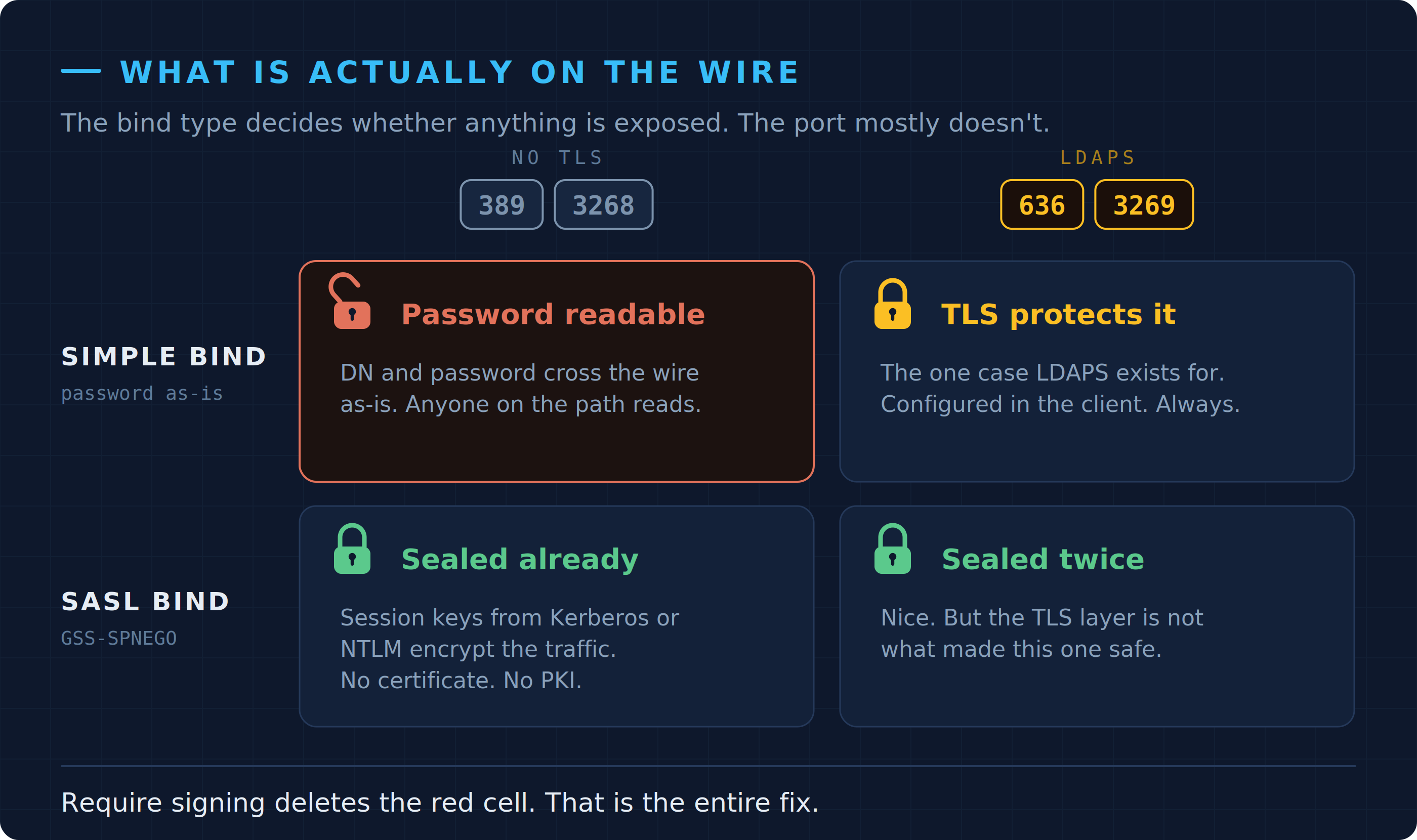
One open padlock in the whole matrix — and signing closes it without a certificate.
(There’s StartTLS as well, which upgrades a connection on 389 to TLS as an extended operation. AD supports it, it’s a nicer design than a dedicated port, and it has exactly the same problem — the client has to ask for it, and clients don’t.)
So what should you do, if not block 389?
Find out who’s still doing simple binds first, before you change anything. Your DCs already know — they just need telling to be louder about it:
|
|
Then watch the Directory Service log. Four events matter, and which of them you see depends on what your policy is set to right now:
| Event | Fires when | Logging level |
|---|---|---|
| 2886 | Every 24h and at startup, while signing is set to None | 0 |
| 2887 | Every 24h, while signing is None and at least one unprotected bind got through | 0 |
| 2888 | Every 24h, once signing is Require and at least one bind was rejected | 0 |
| 2889 | Per bind, when a client doesn’t sign on port 389 — with client IP and identity | 2 |
2889 is the one you’re collecting. Note the logging level column: at the default level 0 you get the 24-hour summary in 2887 and nothing else, which tells you a problem exists but not who’s causing it. That’s why so many people look at 2887, shrug, and move on.
|
|
Let it run for a few weeks, and make sure you cover a month-end or whatever your noisiest period is, because the thing that’ll bite you is the quarterly job nobody remembers. The list is usually much shorter than people expect. Mine tends to be a scanner, an appliance or two, something with a web UI from 2011, and a multifunction printer.
A warning about the documentation
While you’re looking this up: the current Microsoft Learn page on LDAP signing carries an ai-assisted marker in its metadata, and its event table doesn’t match KB4520412. It describes 2889 as a successful signed bind requiring no action, and 2888 as the DC accepting all unsigned traffic. Both are backwards. If you build your monitoring on that table you’ll alert on the healthy state and ignore the one event that actually names your offenders.
KB4520412 is the reference to trust here. It’s older, it’s uglier, and it’s right.
Then enforce signing
Once that list is empty or accounted for, set Domain controller: LDAP server signing requirements to Require signing by GPO — Microsoft’s step-by-step for the policy is solid, including on Server 2025. You get signed traffic, which kills a decent chunk of the NTLM and Kerberos relay paths against your DCs, and the DC will also start rejecting simple binds over unencrypted connections. Which is the thing the finding was worried about in the first place. No certificates involved.
Do the client side too, in a separate policy: Network security: LDAP client signing requirements set to Negotiate signing is the safe intermediate step, Require signing the destination.
You can check where a DC currently stands without opening the GPMC. Both settings live under NTDS\Parameters, and an absent value means “never configured”:
|
|
To prove it took effect, connect ldp.exe to port 389 and attempt a simple bind. A DC that’s enforcing gives you back Strong Authentication Required. If the bind succeeds, your policy didn’t apply.
Channel binding, and the auditing trap
While you’re in that policy, do Domain controller: LDAP server channel binding token requirements too. When supported first, Always once you’re confident. The mechanism is straightforward enough: the client derives a Channel Binding Token (CBT) from the parameters of the TLS session and sends it along with the bind, and the DC checks that the token matches the channel the bind actually arrived on. That closes the relay gap which signing on its own leaves open for connections that are using TLS.
There’s a catch here that costs people a maintenance window. At the legacy default of Never, all you get is event 3041 nagging you every 24 hours and event 3040 counting unprotected LDAPS binds over the same period — counts, never clients. The events that actually name anyone — 3039 for a failed validation, and the audit-only 3074 and 3075 added in the 2023 updates — are only generated once the policy is already at When supported or Always. So you can’t audit your way to a client list first and then change the setting; you have to move to When supported to find out what would break under Always.
3075 is the one to watch: it names clients that are capable of channel binding but didn’t send a token — the bulk of what will fail once you go to Always. (Clients that aren’t capable at all also fail under Always, and those won’t have shown up in 3075, which is an argument for treating When supported as a destination rather than a waypoint in mixed environments.) On Windows clients, channel binding capability depends on the CVE-2017-8563 update being present and Extended Protection for Authentication not being switched off via SuppressExtendedProtection.
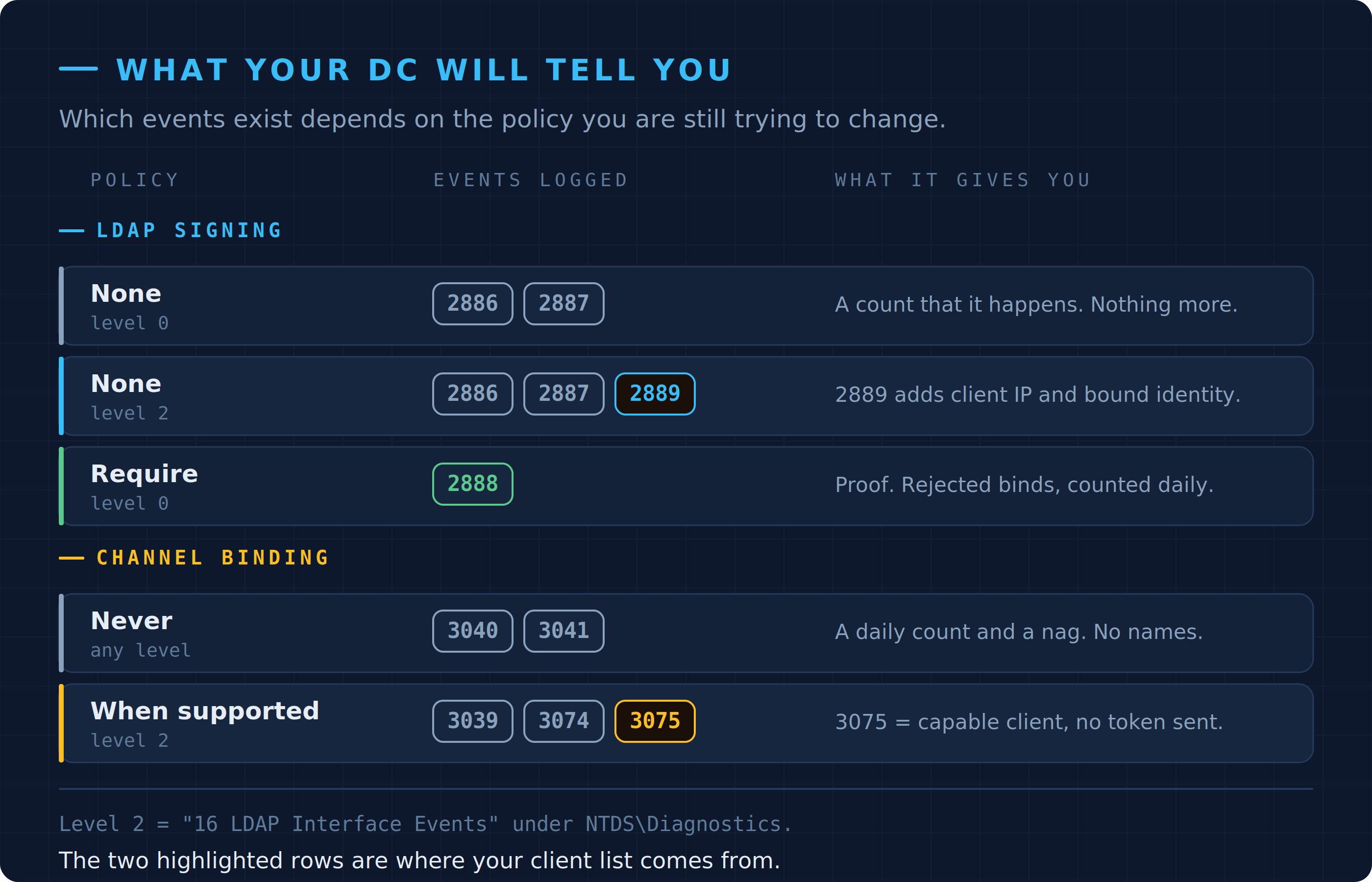
The highlighted rows are the two states worth being in while you collect. The defaults tell you least.
And the genuine holdouts
If you’ve got an application that really needs a simple bind and can’t be changed — fine, that happens. Point that application at 636 or 3269 and configure the certificate trust inside the application. Note where that config lives: in the client, not in the directory. Which is exactly why the DNS approaches were never going to work.
(For AD LDS instances there’s no Group Policy for this; you set LDAPServerIntegrity in the registry per instance, and it takes effect without a restart. Mind the values: AD LDS uses 0 for off and 2 for required, while on a DC the policy maps to 1 and 2.)
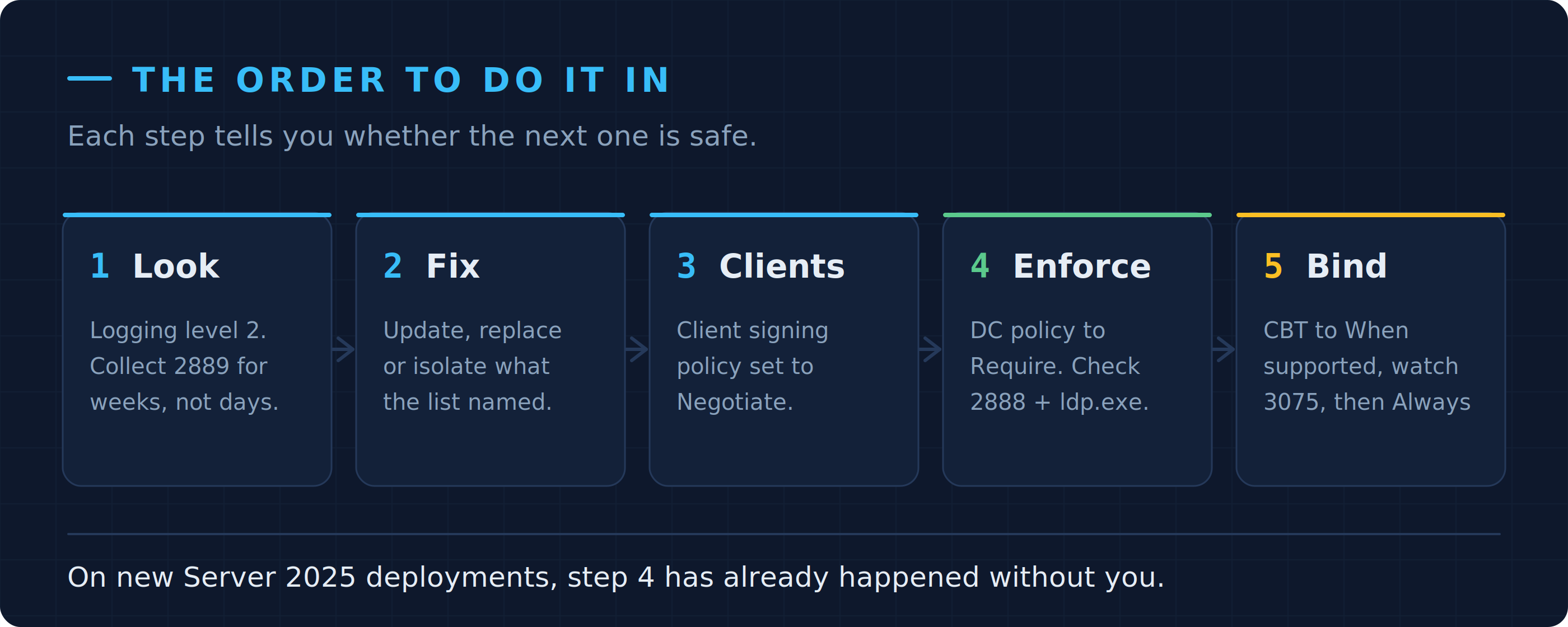
None of it needs a certificate until step five, and even then only for the stragglers.
Server 2025 has taken the decision off you
Everything above used to be optional. On new Active Directory deployments it isn’t any more.
Windows Server 2025 introduces a second, separate policy: Domain controller: LDAP server signing requirements enforcement. Left at Not Configured it behaves as though it were Enabled, and it overrides the old signing policy when both are set. So a freshly built 2025 forest requires signed binds out of the box, without anybody choosing that. Upgrades are different — an in-place upgrade keeps whatever you had, on the reasonable assumption that Microsoft doesn’t want to break your printer for you.
The practical consequence is a slightly odd-looking configuration if you’re deliberately staging the rollout: leave the old policy at None and flip the new enforcement policy to Enabled when you’re ready, rather than setting both. And if a third-party application falls over on a new 2025 DC, that enforcement policy is the first thing to check, because nothing in your GPO tree will show you a setting you never made.
The channel binding side is less clear than it looks. Microsoft’s documentation says new 2025 deployments default to When supported with auditing enabled; several people writing up the change in the field report no default change at all and channel binding still sitting at Never. I haven’t managed to reconcile the two, so check it on your own DCs rather than trusting either of us — the registry query above takes ten seconds.
Worth noticing what Microsoft actually did here, though. Faced with a decade of insecure LDAP binds, they did not force everyone onto LDAPS. They turned on signing.
One caveat before you file this as solved
Signing and channel binding are necessary. They are not magic. CVE-2025-54918, patched in September 2025 and rated critical by Microsoft, is an NTLM relay against LDAP that works by manipulating the authentication packets so the protections don’t engage — it was reported as effective against domain controllers that already had signing and channel binding configured.
The lesson isn’t that the hardening is pointless, it’s the usual one: configuration is not a substitute for patching, and neither is a substitute for getting NTLM out of your environment. Signing raises the floor. It doesn’t end the argument.
So
The advice isn’t wrong so much as aimed at the wrong place. It reads as an infrastructure setting and it isn’t one, it’s a per-client decision, and chasing it forest-wide gets you certificate management overhead and a few broken applications in return for encryption you already had.
The finding will still be in next year’s report. At least now you’ve got something to put in the response column.